Stay right here.
Open and switch tabs while your game stays in the side panel. Close it when you’re done, and reopen it from the toolbar.
 Solitaire-Online
FOR GOOGLE CHROME™
Your favorite Klondike, right beside your tabs. Open a hand, take a breath, and get back to your day whenever you’re ready.
Works offlineNo adsYour original cards
There’s something lovely about making a little space for yourself.
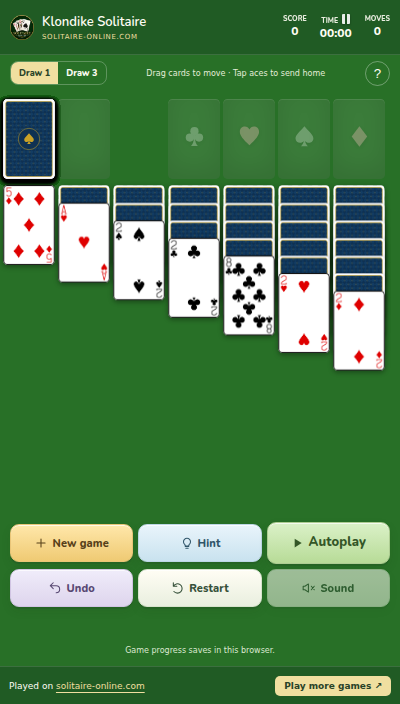
Switch the sample tabs. Your game stays in view.
A FAMILIAR LITTLE ESCAPE
All the pleasure of a good hand, tucked into a corner of your browsing day.
Open and switch tabs while your game stays in the side panel. Close it when you’re done, and reopen it from the toolbar.
Your original Klondike game, card artwork, and drag controls. Play Draw 1 or Draw 3, move whole runs, and undo a change of mind.
Ask for a hint or start Autoplay. Press Stop to take over at any time. Your hand and progress save on this device.
FROM YOUR TOOLBAR TO YOUR TABLE
Install Solitaire Online from its Chrome Web Store listing.
Open Chrome’s extensions menu and pin Solitaire Online to your toolbar.
Click the icon to open the side panel. Your next hand is right there.
SMALL PERMISSION. SIMPLE PURPOSE.
The side panel gives Solitaire Online a place to play. Your browsing history and the pages you visit stay private.
A FEW GOOD QUESTIONS
No. The extension opens in Chrome’s side panel and stays open while you open or switch tabs in the same window. You can close the panel whenever you want.
Yes. It uses the original Solitaire Online Klondike game, card graphics, rules, and drag controls, with Draw 1 and Draw 3.
Yes. The game, graphics, hints, and autoplay solver are included in the extension. The “Play more games” link needs a connection to open the website.
Your current cards, score, moves, time, and preferences stay in local extension storage. Undo history remains available while the game stays open, including across tab switches, but resets after closing or reloading.
No. The extension requests the sidePanel permission to show the game beside your tabs. It does not request access to your browsing history or page content, and it has no ads or analytics.
The extension is designed for desktop Google Chrome 116 or newer. For Android, use our separate Solitaire Online app.
Your next hand is closer than you think.

Google Play and Chrome Web Store are trademarks of Google LLC.